This guide shows what the system checks in each application, in what order, and how to submit one that arrives complete.
You got here because you want to understand how the process really works. Not as a promise, but step by step.
If you have already tried and received no response, the reason is almost never where you think. This guide shows exactly what the system checks before displaying the available products.
ACCESS THE FREE TRIAL CENTERThe program exists and works. But most applications are eliminated during the automatic screening due to profile details the person did not know mattered. Those who understand the criteria submit a completely different application.
Notice: Independent content based on the public information of the SHEIN Free Trial Center program. This site has no affiliation with SHEIN. We do not request bank details, passwords, or payment of any kind.
How to find the Free Trial Center in the app
Step 1 of 6
The path is not direct: most users never got to see the available products
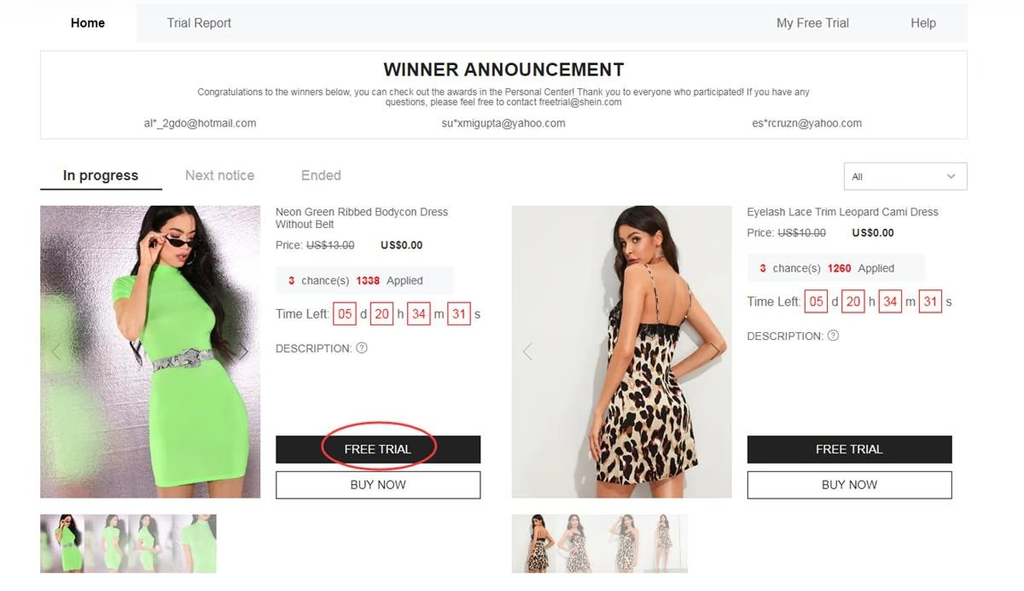
In the SHEIN app, tap Profile, in the bottom-right corner. Scroll the screen until More Services and find the Free Trial Center.
Before displaying any product, the system automatically checks whether the account profile meets the requirements of the current cycle.
Accounts with incomplete information do not pass this check. The dashboard simply does not display any products, without explaining why.
- Confirm your full name, address, and size preferences in your profile before accessing it.
- The weekly cycle opens at 1 p.m. on Monday. Access it early to see more options.
- The delivery address must be valid for the country of the active branch.
How to choose the product and submit the application without errors
Step 2 of 6
The address is verified at this moment, not later. An error here eliminates everything
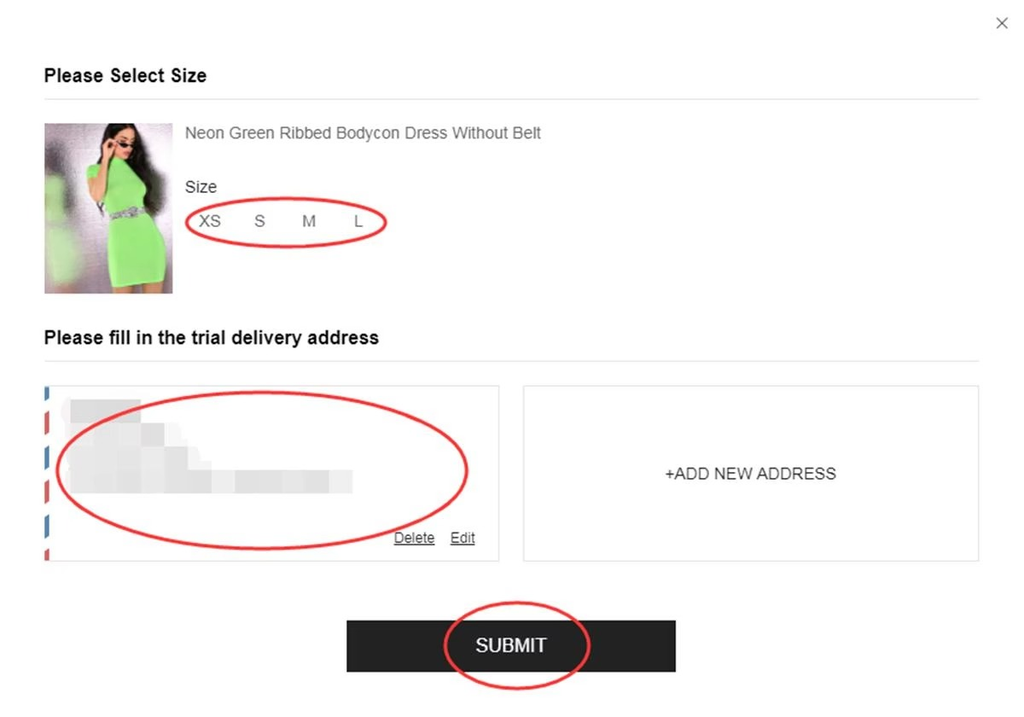
After choosing the product, the app asks for confirmation of size and delivery address.
The system checks at that moment whether the address is correct. Incomplete addresses cause immediate rejection, without notice.
After confirming, it is not possible to change the size. Check the size chart before finalizing.
- Check the complete address before confirming.
- If you have more than one saved address, choose the correct one.
- Note the product you chose: you will need this information for the evaluation.
Where to track the application result
Step 3 of 6
Those who look for it in regular orders find nothing and think the application has disappeared
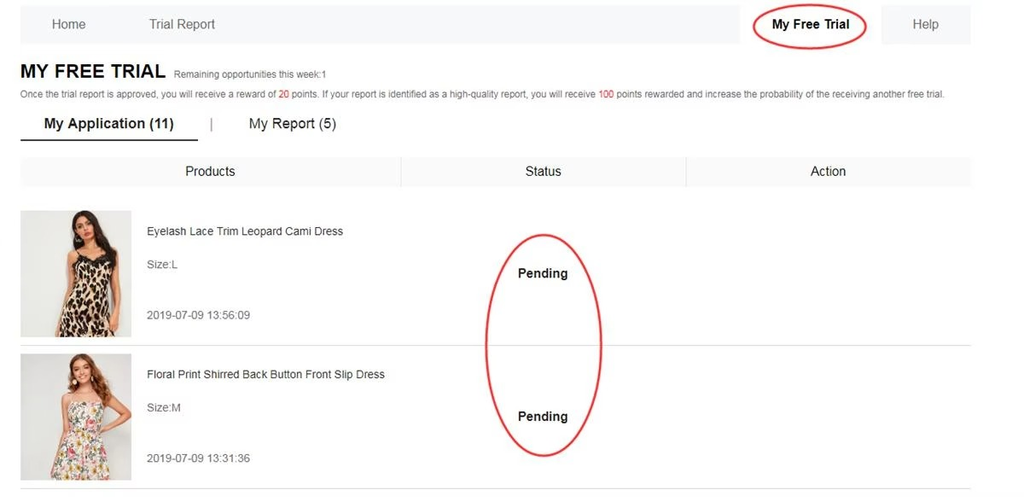
The application does not appear in SHEIN's regular orders section.
Tracking is available in “My Free Trial”, within the Free Trial Center itself.
The possible statuses are:
- Under Review
- Shipped
- Delivered
- Review Submitted
- Failed
To track it correctly:
- Access “My Free Trial” regularly to check the updated status.
- The deadline for submitting the review after delivery is indicated in this section.
- “Under Review” for more than 5 days generally indicates non-selection in this cycle.
How to submit the review correctly on the first attempt
Step 4 of 6
It is the only step in the process that is completely in your hands
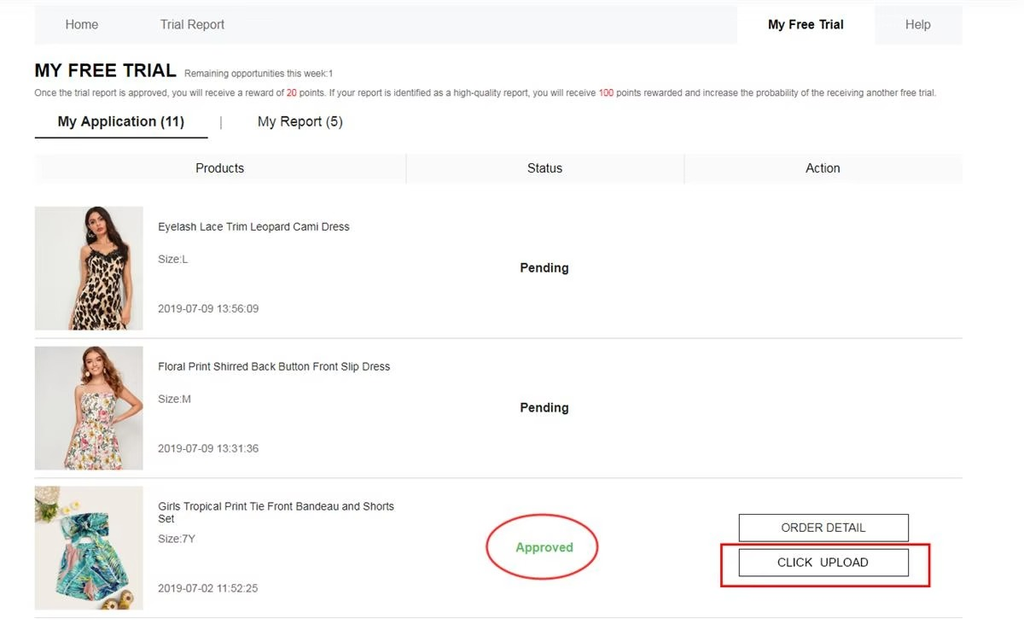
When the product arrives, the section “My Free Trial” displays a button to submit the review.
The system automatically checks whether it meets the requirements before accepting it. Reviews without real photos or with generic text are frequently rejected.
- Take photos as soon as the product arrives: the box, the product by itself, and the product in use.
- Describe the product with real details: material, actual size, and finish.
- Avoid short and generic texts: the system identifies reviews without real content.
How the review history influences upcoming cycles
Step 5 of 6
Each accepted review improves the profile for subsequent cycles
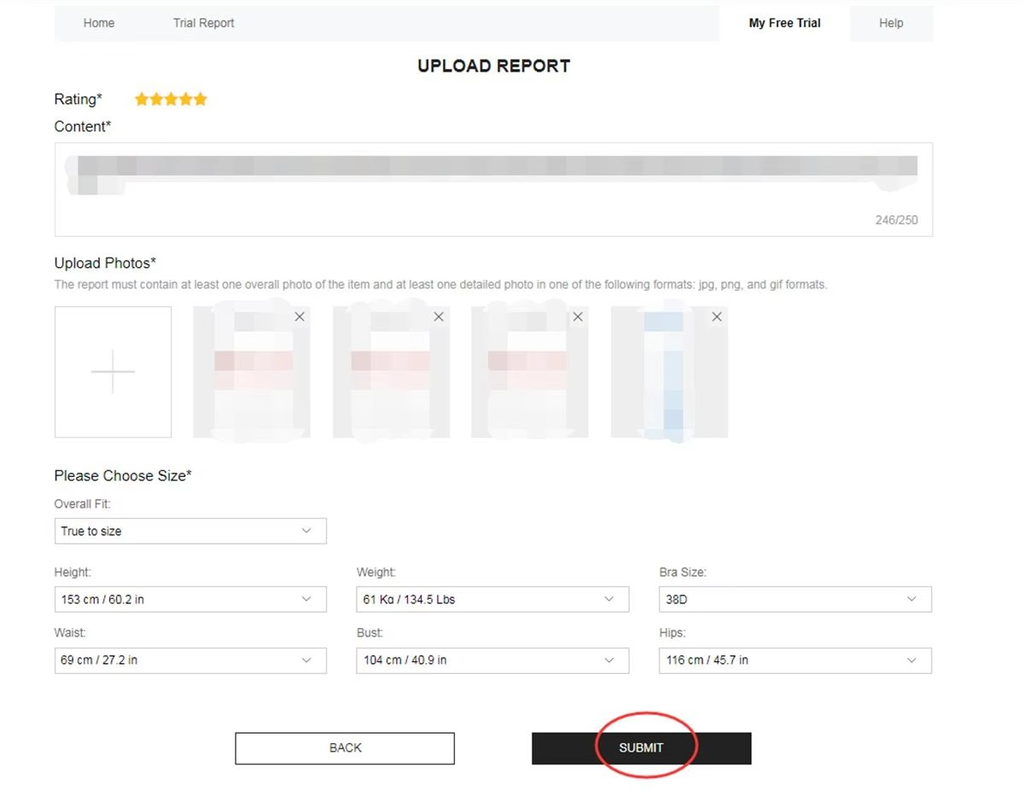
Accepted reviews accumulate points in the section “My Report”.
This history is checked by the system when each new application is submitted. Accounts with a history of accepted reviews tend to receive priority in the selection.
- Access “My Report” to confirm the points for each accepted review.
- Keep the profile updated with size and style preferences.
- Applications in categories with a previous history tend to have better results.
What to do if the review fails
Step 6 of 6
There is a second chance that most people do not use because they are unaware of it
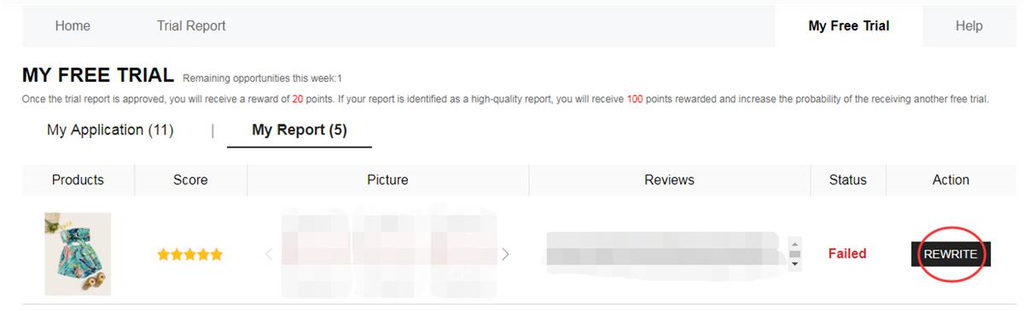
When a review receives the status “Failed”, the button “Rewrite” appears next to the item in “My Report”.
This button allows you to correct and resubmit it within a deadline indicated on the screen itself.
After the correction is accepted, the points are credited as usual.
- Locate the item with the status “Failed” within “My Report”.
- Tap “Rewrite” and correct the text and photos as needed.
- Resubmit within the deadline indicated on the screen.
What helps and what eliminates the application
Increases your chances
- Complete profile with updated size, style, and address.
- Application submitted at the beginning of the weekly cycle.
- History of reviews accepted in previous cycles.
- Review with real photos and a specific description.
- Use of the Rewrite button when the review is rejected.
Automatically eliminates
- Profile with blank or outdated fields.
- Address incompatible with the active branch.
- Application submitted at the end of the cycle.
- Review without photos or with generic text.
- Letting the review deadline pass after delivery.
Information about the program
The Free Trial Center is managed exclusively by SHEIN.
The selection criteria, categories, and deadlines may be changed by the platform at any time.
Participation is subject to the terms published in the SHEIN app and website.
This guide is independent and based on the program’s public information.
Frequently Asked Questions
Check before submitting the application
Confirm each item below before accessing the dashboard. Applications without this correct information are automatically eliminated during the initial screening.
- Full name entered in the SHEIN account profile.
- Complete and correct delivery address.
- Updated clothing size in the profile preferences.
- No open reviews or reviews with “Failed” status left uncorrected.
- Access made at the beginning of the weekly cycle, when more products are available.
- Photos of the previous product saved, in case there is a pending review to submit.
- “My Free Trial” section checked to confirm that there is no pending review.
Now you know what the system checks
The strongest application is not the fastest one. It is the one that arrives with the right profile, at the right time in the cycle.
You just saw both.
The next step is to access the Free Trial Center with your complete profile and check the products available in this cycle.
ACCESS THE FREE TRIAL CENTERThe link takes you directly to the official program. Selection is not guaranteed, but an informed application has a better chance of success.
Final notice: Independent informational content based on publicly available information about the SHEIN Free Trial Center program. This site has no partnership, sponsorship, or official authorization from SHEIN. Participant selection is carried out exclusively by the platform. We do not request bank details, payments, or sensitive personal information.